


If you're a roofing business owner, you've had at least one of these experiences recently.
- You hear "AI is changing everything" but don’t know what to do about it.
- Everyone’s selling you an AI tool, but most of them are overpriced.
- It’s impossible to know what’s real and what’s snake oil.
The roofing industry’s in a weird middle ground with AI right now.
Some contractors are still learning CRMs and digital estimates. Others are deep into prompts, custom workflows, and automation stacks. But most roofers fall somewhere in between. Roofers need practical, affordable AI tools that help now without taking over their lives.
Sound about right? This guide’s for you.
Below are some of the most affordable, well-reviewed AI tools for roofers. You can start using these right now to solve or improve specific parts of your roofing business: admin overload, marketing paralysis, slow follow-ups, insurance headaches, you name it.
No need to adopt everything at once. Take time to research, learn which tools are out there, and try incorporating them one at a time.
Insurance claims: Brelly AI
If you've worked insurance jobs, you know how much time they burn. Estimates, supplements, documentation, back-and-forth emails. It’s a lot to keep straight.
Brelly AI is made for those insurance claim workflows. It helps roofing contractors review claim documents, flag missing items, and assist with supplement prep. It gets UPPA compliance, policy language, and building codes. It’s not a replacement for a real person who understands the nuances of insurance claims, but it speeds up the tedious parts that slow you down.
Brelly is especially useful for:
- Contractors doing lots of insurance work.
- Teams juggling multiple active claims.
- Office staff buried in insurance paperwork.
If you like the idea but want to shop around, there’s also Federato and a few larger enterprise platforms. Just beware, since some of them get pretty expensive.
Pricing: Starts in the low hundreds per month, based on usage and features.
24/7 phone coverage: AI Receptionist
If you're a one-man show or trying to keep your roofing business lean, guaranteed you spend a lot of your day fielding calls.
Every time you pick up the phone, it's minutes sucked away from either your family or the other parts of the job. But you have to pick up as much as possible or else risk abandoning leads or losing trust with locals who need help fast. It's a real problem.
The solution is NOT a typical AI chatbot (which can often overtalk, make sh!t up, and frustrate customers). And you don't want a typical AI answering service, which is basically a glorified note-taker that still forces you to call back to actually book something. Those are not helpful.
Instead, go with something purpose-built for the roofing industry: Roofr's own AI Receptionist.
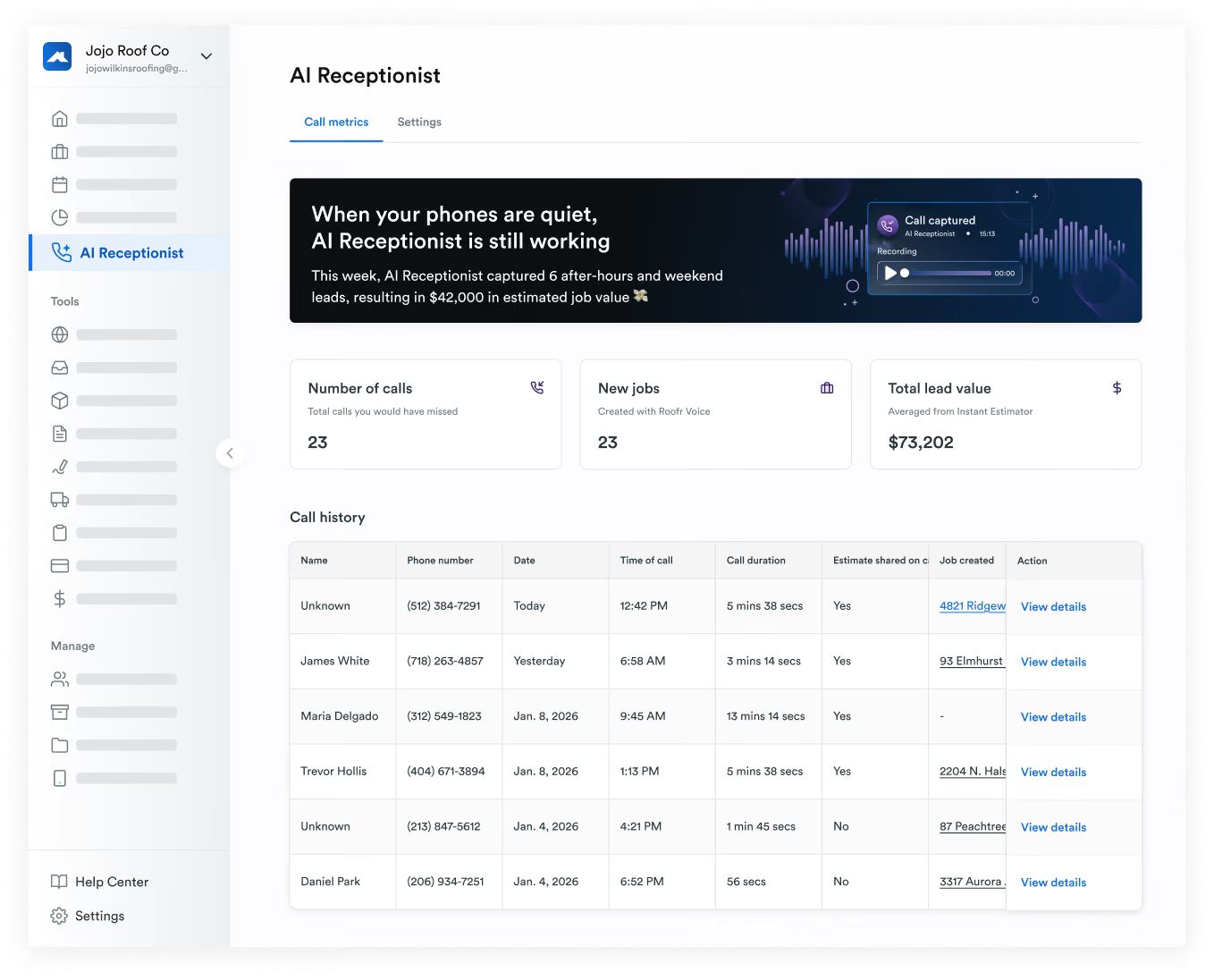
AI Receptionist collects customer info, looks at your team's calendar, and books on-site visits with every new lead. It's fully configurable, so you know the new customer experience will go exactly the way you want it to.
- Known customers and folks who ask for a human get sent right to you, so there's no "press 1 to..." or wasting anyone's time.
- All new lead info, appointment details, and the full call transcript lives in the Roofr CRM for you to review anytime.
- And it even screens spam calls and weeds out the tire kickers for you.
If you want to get a good night's sleep, enjoy a week away with your family, and stop stressing about losing leads to the competition just because you couldn't answer the phone on time, AI Receptionist might just be life changing for you.
Pricing: $85/month when billed annually. Or try it month-by-month and see how you like it.
By the way: If you already use Roofr’s Instant Estimator to give potential customers a pricing estimate right when they want it, you can combine that in with AI Receptionist too. Your receptionist will offer new leads quick quotes over the phone and drop it into your CRM, so they're primed, informed, and ready to buy before you've ever even had a conversation with them.
Combine that with great service, branding, and material options, and those leads are yours to lose.
Documentation and analysis: NotebookLM
Sure, popular LLMs like ChatGPT can do basic research for you. But they can also make mistakes. They pull information from everywhere (not just your data / local niche), and they can even leak your own data or private customer info if you’re not careful with the data controls. Those platforms can still do good work for you. Just be aware of the trade-offs.
An offshoot of Google Gemini, NotebookLM is a solid roofing business AI tool for anyone who deals with a lot of documents. Building codes, manufacturer specs, warranties, contracts, you name it.
Upload your PDFs, notes, documentation. Then ask it to answer questions like:
- "What does this warranty actually cover?"
- "Summarize the key installation requirements."
- "What changed between these two versions?"
Instead of flipping through pages, you’ll get clear answers pulled right from your files. It's a solid time-saver for training new hires, reviewing manufacturer docs before a complex job, and making sense of dense contracts.
Might be for you, might not be, but definitely worth checking out if you’re into time saving.
Pricing: Free to start, with expanded features on paid Google plans.
AI website builder: Roofr Sites
If your current website's completely outdated, or you've just been delaying and just need to get a professional website online fast, AI-powered website builders are a great way to get something live without hiring a web developer.
Depending on your familiarity with UI and coding, you'll see services like Replit and Wix recommended often. Both can generate layouts, copy, and site structure from a few simple prompts.
But you're a roofer, not a coder. You'll want a solution tailored for this industry, based on local roofing business best practices. If you want the problem off your plate entirely, check out Roofr Sites. It's a very affordable AI website builder for roofing company needs specifically.
It does what a good roofing website should: makes you look professional and trustworthy, lists your services and service areas, showcases reviews, and converts interested homeowners who want an instant estimate or a call.
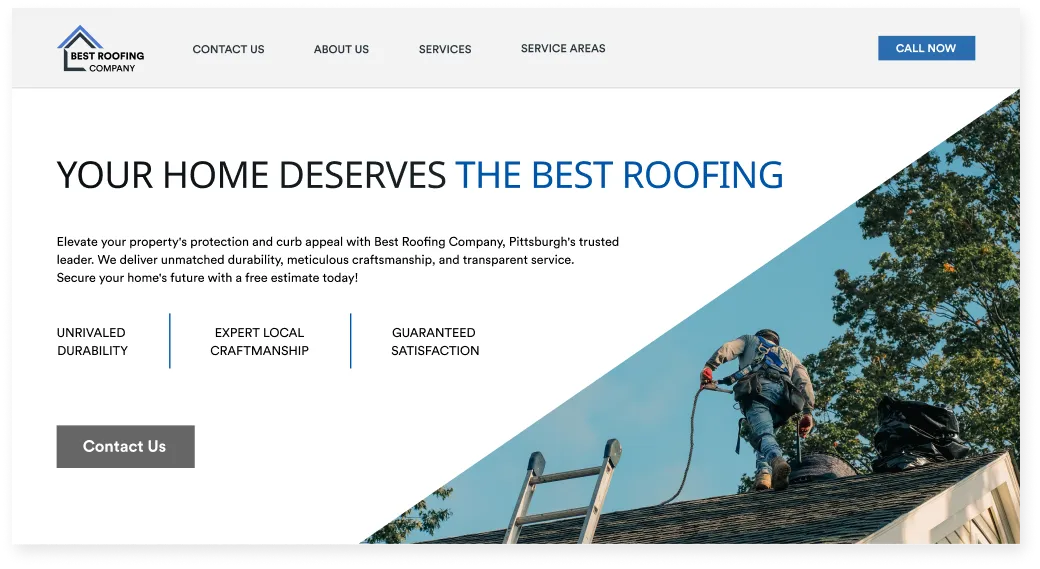
Sites is nice because it builds AND frequently updates your website for you with very little lift from your end. You always keep full control to hop in and customize or update specific things as needed, but otherwise you can leave it alone to do its thing.
If you wanna be online without it becoming a full-time job, Roofr Sites is a perfect solution. And especially if you already use Roofr as your CRM or for measurement reports, it's a no-brainer to give it a shot.
Pricing: Roofr Sites costs just $85/month if you pay annually.
Workflow automation: n8n

This one is for roofers who love tech, love custom-built workflows, but have no interest in becoming software engineers. No developer needed here.
Fair warning: these workflow tools can get pretty large-scale and technical. So this is probably something to explore when your company is established with a fairly locked-in process. NOT for when you’re still growing, adapting, and finding new customers.
Tools like n8n and AirOps let you build custom workflows to solve tasks like:
- Managing and following up with leads.
- Syncing data between tools automatically.
- Planning and publishing local optimized content.
- Triggering notifications on status changes or specific actions.
Established CRMs like Roofr will do a lot of this for you intuitively, based on existing best practices, without you needing to think about it. But if you have a really specific vision for your workflow, and you like to have full editorial control over your backend, these tools can help you own that.
These tools are powerful but totally optional. If you enjoy tinkering and want to build your own long-term workflow solution, they're worth exploring. If that's not your thing, you can safely skip 'em.
Pricing: n8n has a free self-hosted option. Paid plans typically start around $20–$50/month. AirOps gets more expensive, especially if you get into scaling content automation, so talk to them for pricing.
Design and marketing: Canva AI
Unless your roofing business is huge, you don't need a full-time designer. But you do need yard signs, social posts, sales handouts, branded visuals, the works. And they can’t look like they were made in Microsoft Word.
Thankfully, with just a bit of practice, there are loads of tools available now to help create passable (or downright beautiful) designs that won’t appear amateurish.
Canva's AI tools help you generate layouts, resize designs for different platforms, and even suggest copy. Canva is also a pretty safe way to stay within standard templates and common design trends. Kittl is a neat alternative if you want bolder, more stylized designs that have a bit more punch.
These tools shine when you already have an established brand look, and you need something "good enough" fast. A storm just rolled through your market. You need a post up today. No time or budget to wait two weeks for a designer.
Pricing: Free tiers are available. Paid plans usually run $12–$20/month.
Disclaimer: Canva's actual AI image generation isn't considered the best, so if you want something specific just poofed up by an AI prompt, maybe default to ChatGPT or Nano Banana. That said, those tools have a distinct look that turns a lot of folks off. Use fully AI generated imagery at your own discretion, and maybe test options with homeowners directly to see what they respond to.
Video editing: Descript or Riverside

Here’s one of the easiest and most commonly adopted AI use cases for roofing contractors (or anyone).
If you record videos at all — job walkthroughs, customer testimonials, training clips — these tools will save you serious time.
They automatically write you a transcript, cut filler words, add captions, and pull short highlight clips to put on social media. You don't need to become a video editor. Upload, clean it up, and share.
- Descript is one of the most popular for video editing.
- Riverside is strong for high-quality podcast or video recording.
- Clipchamp is simple and plays nice with Windows.
Pricing: Free versions are available. Paid plans start around $15–$30/month.
Photo organization: CompanyCam
If you've ever spent 20 minutes scrolling through your phone looking for "that one roof photo from last summer," you get the value here.
Huuuuuge for roofers.
CompanyCam uses AI to automatically tag photos, organize them by job, and make documentation easier for insurance claims and customer communication. It's one of those tools that feels like no big deal until you're actually using it. Then you wonder how the hell you managed without it.
It also integrates directly with Roofr so you can sync jobs and use photos in your Roofr proposals. If you’re a Roofr CRM user, it’s pretty sweet. (And if you’re not, you really gotta check it out.)
Pricing: CompanyCam plans start at around $79/month, plus $29 per additional user.
Accounting: QuickBooks
Accounting isn't optional. But chances are good it’s not your fave part of the job.
QuickBooks now uses AI to categorize expenses, flag unusual transactions, and speed up reconciliation. You’ll still need a bookkeeper, but it can really cut down on errors and take some of the manual grind out of keeping your books clean.
Have a solid process nailed down first, and be sure to double-check the AI’s work (especially at first), like you would with an intern or new hire. Once you iron it out, this is a great way to reclaim some of your time.
Pricing: Starts around $30/month, depending on the plan.
Roofing visualizer tools
You probably already know about these ones. Sometimes a homeowner just needs to see what the roof will look like before they commit.
Popular manufacturer visualizer tools let customers preview shingles and colors on a photo of their own home. It really helps speed up decisions and reduces back-and-forth during the sales conversation.
Depending on your go-to materials, check out some of these:
Pricing: Usually free, provided by the manufacturers.
Final thoughts
AI tools are getting better fast. Like REALLY fast. They can genuinely help roofing businesses work more efficiently, stay organized, and cut down on the admin work that eats into your day.
But for most roofers, roofing AI tools work best when they're layered on top of a solid foundation, not used as a substitute for one.
So before you start building a big tech stack, get your core processes dialed in first. CRM. Measurements. Estimates. Proposals. Scheduling. Material orders. Invoices. Simple automations. Stuff your whole team will use reliably to create a consistent lead generation and high-quality service experience for customers.
Once you have an all-in-one system like Roofr, with a locked-in process that you know works, adding AI tools becomes less overwhelming (and way more useful).
TL;DR: Start simple. Get organized. Understand what works for your business. Then layer in AI tools as you need them, one at a time.
Happy fact fAInding.