


For years, roofing contractors who handle insurance claims and estimates in Xactimate have told us the same thing:
“I love using Roofr for my retail jobs, but I can’t use it for my insurance work.”
Insurance claims often require Xactimate- and that means you need ESX files.
Xactimate works with 24 of the top 25 insurance companies in the U.S., so if you’re doing insurance work, being able to estimate inside Xactimate isn’t optional. Until now, that meant a frustrating workflow:
- Ordering ESX reports on one platform
- Ordering measurement reports on a different platform
- Tracking the job in different locations.
It slowed down the process and made it harder to keep everything organized.
What’s new
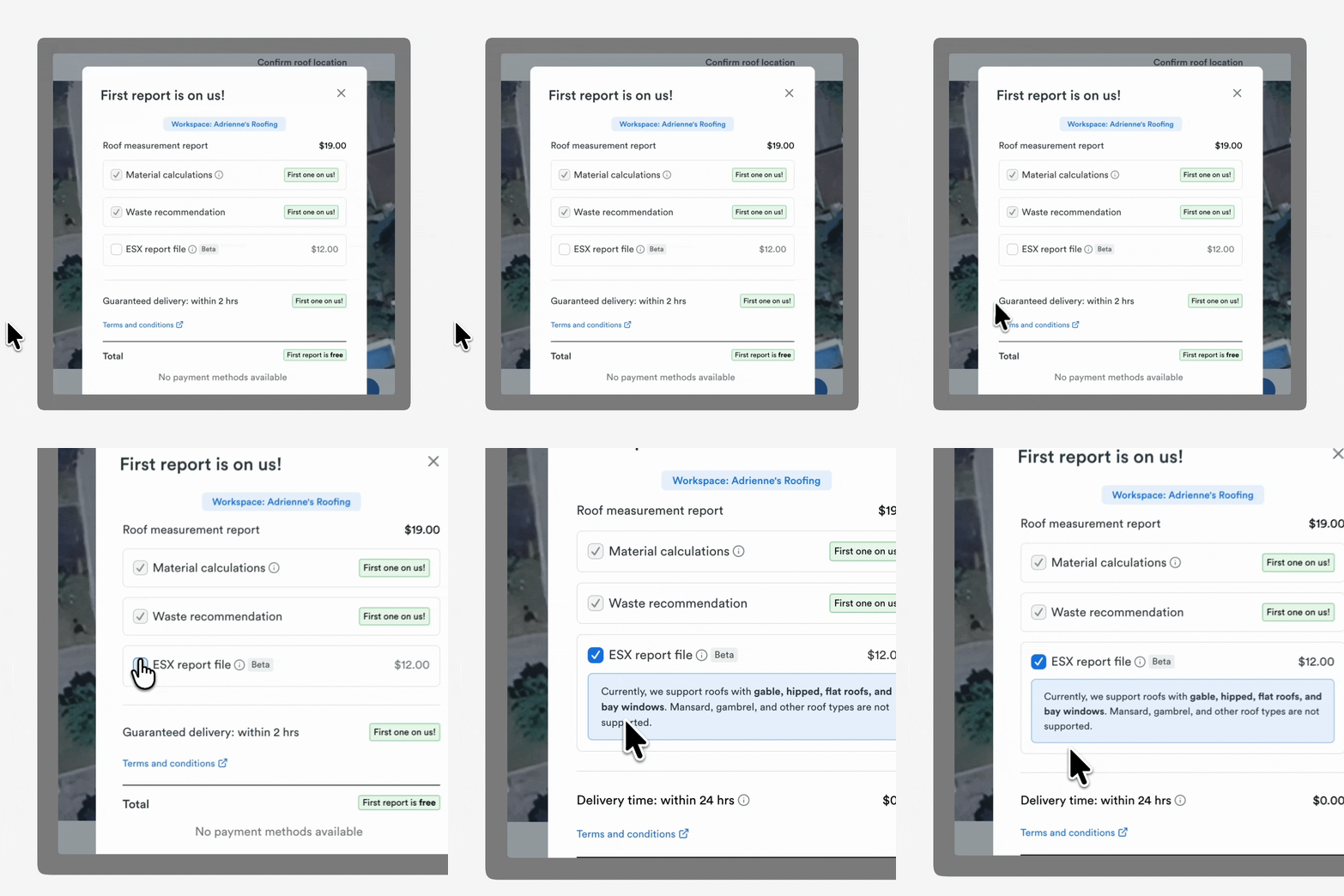
You can now order ESX reports directly through Roofr when purchasing a measurement report. That means you can easily import your Roofr measurements into Xactimate to complete insurance estimates.
Why that matters:
Now, whether you're running a retail job or an insurance claim, you can order everything you need for your estimate without leaving Roofr.
How it works
Getting an ESX report through Roofr is simple.
1. Secure a lead
Whether the lead comes from Instant Estimator, referrals, or your own marketing, the job starts in Roofr, like it normally would.
2. Order a measurement report
When ordering a Roofr measurement report, you’ll now see the option to add an ESX report during checkout.
3. Add the ESX report
Selecting the ESX add-on adds $10 to your report order (with a subscription plan)
Your ESX report can be delivered in as little as 3 hours, and you’ll still receive your standard Roofr report based on your normal turnaround time.
4. Download the ESX file
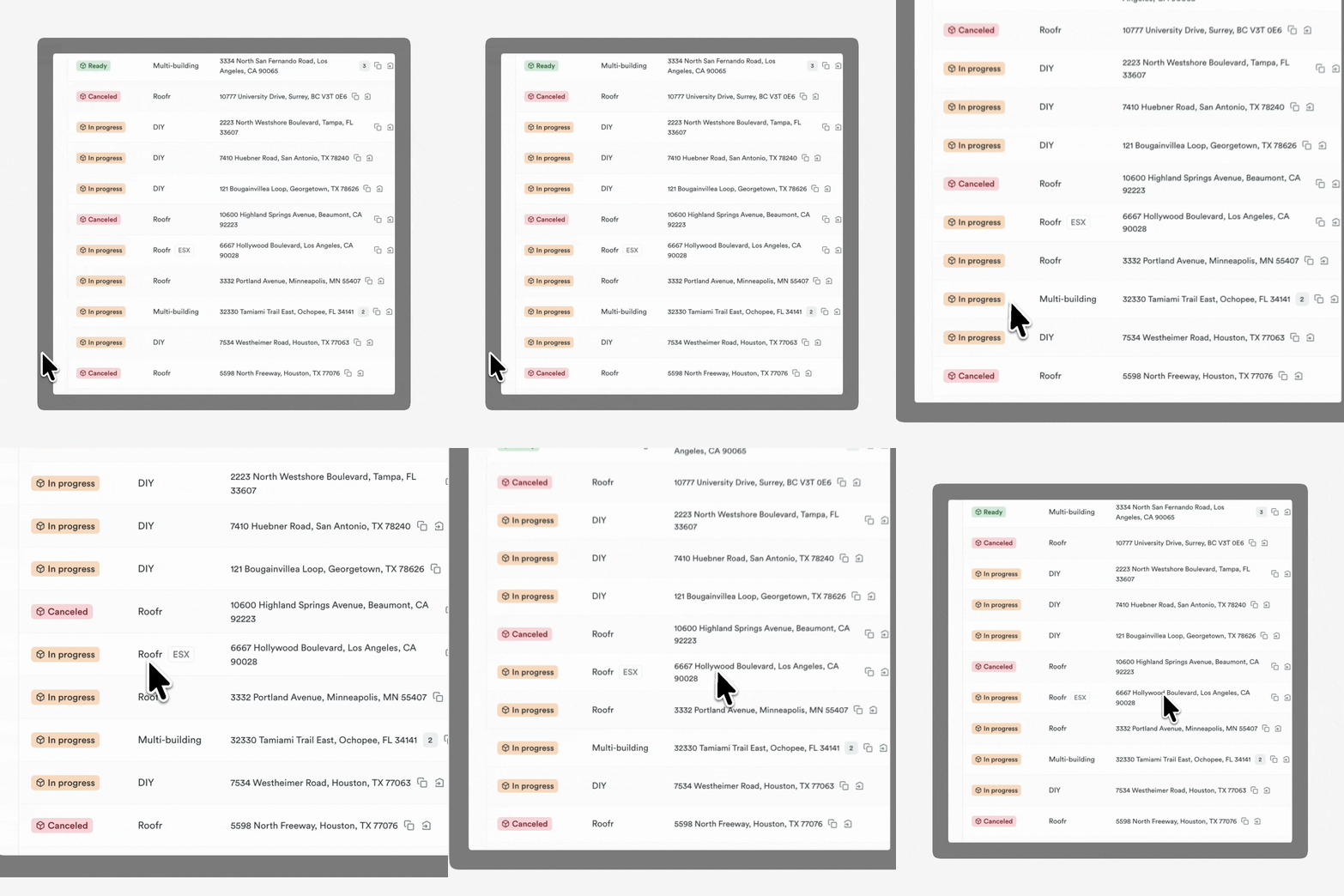
Once the report is complete, you’ll see an ESX tag on the measurement report.
From there, you can download the ESX file directly from Roofr.
5. Upload it into Xactimate
The ESX file can be uploaded into your Xactimate project, allowing you to generate an insurance estimate without having to redraw the roof.
6. Finish the job in Roofr
Once your Xactimate estimate is complete, simply upload the estimate PDF back into the job card in Roofr.
From there you can:
- Add it to a proposal
- Collect signatures
- Communicate with the homeowner
- Track the job through completion
Everything else stays inside Roofr.
How ESX reports work with the rest of Roofr
ESX reports fit naturally into the workflow contractors already use.
You can combine ESX reports with:
- Instant Estimator – capture leads and start jobs faster
- Measurement Reports – get accurate roof measurement reports for both retail and insurance jobs
- Proposals & Signatures – send contracts and proposals to homeowners for approval and e-signature.
- Customer Communication – keep homeowners informed during the process
- Automations – streamline follow-ups and job updates
- Invoicing – collect payment once the work is complete
- Job Board – track every job from lead to completion
Instead of juggling multiple systems, Roofr becomes the hub for the entire job.
What this means for your business
If you’re a roofer doing insurance work, ESX reports in Roofr removes a major barrier for your workflow and budget.
Here’s what that unlocks:
Lower cost reporting
Get both a Roofr measurement report and an ESX file for under $31, regardless of roof size.
Faster insurance estimating
Upload your measurements into Xactimate without manually recreating the roof.
One platform for retail and insurance
Manage leads, reports, proposals, signatures, and job tracking in one place.
Better job organization
Keep all your documents, estimates, and communication tied to a single job in Roofr.
Who it’s for
This feature is especially useful for:
- Roofers who handle insurance claims
- Contractors doing both retail and insurance jobs
- Adjusters and supplementers who estimate in Xactimate
- Roofers looking for a more affordable way to generate ESX files
Start using ESX Reports today
ESX reports are now available when ordering measurement reports in Roofr.
If you handle insurance work and use Xactimate, you can now generate ESX files directly through Roofr and keep your entire workflow in one place.
Your next insurance claim can start and finish in Roofr. Add an ESX report at checkout.
Need help getting started? Reach out to our support team, or your account manager.